
Why Your Website Isn't Generating Leads
8 conversion gaps killing your CT business website leads: weak CTAs, slow load, broken mobile, unclear value prop. Diagnose and fix each one.

We know how frustrating it is to see steady traffic but zero incoming calls. If you are wondering, “why is my website not getting leads”, you are dealing with a conversion problem rather than a traffic shortage.
Getting 500 to 2,000 visits a month with almost no inquiries means predictable patterns are likely involved. Our team of professional service experts has found that most of these gaps are fixable in days rather than weeks.
The latest 2026 benchmarks show the average US website conversion rate is just 2.35%. Top performers routinely clear 11% by removing basic friction points.
We will break down the eight main reasons this happens and outline the practical fixes you can implement immediately.
1. Weak or Missing Call-to-Action
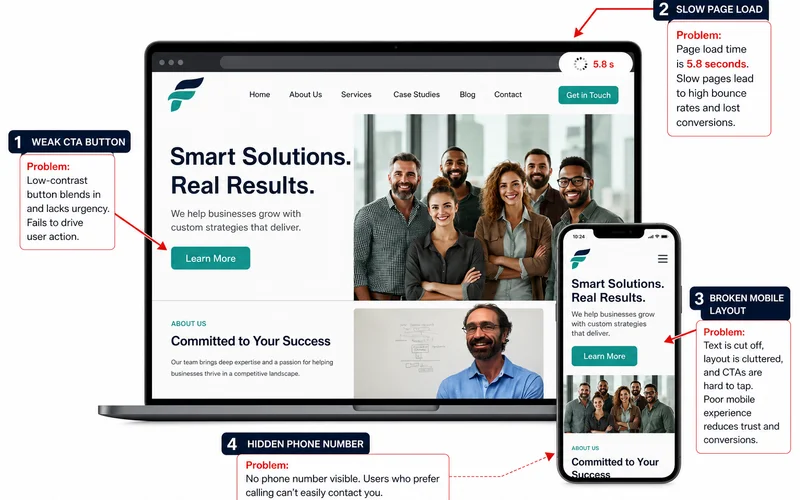
A weak call-to-action leaves visitors guessing what to do next, which directly stops your lead generation. One of the biggest website conversion problems is having no explicit next step for the user to take.
We frequently see websites with either no CTA or a generic “Learn More” button that fails to drive action. In fact, 2026 marketing statistics reveal that 70% of small business websites lack a call-to-action on their homepage entirely. A clear, specific CTA can increase conversion rates by 161%.
Our strategy is to place one primary CTA above the fold on every page. Specific verbs perform best.
| Generic CTA (Low Conversion) | Specific CTA (High Conversion) |
|---|---|
| Learn More | Get a Free Quote |
| Contact Us | Book a Consultation |
| Submit | Call Us Now |
2. Slow Load Time on Mobile
If your site takes more than 3 seconds to render its main content on a phone, you are losing roughly 40% of visitors immediately. Speed kills conversions before any other variable gets a chance to work.
We track mobile performance closely because the US average retail mobile load time is currently 6.3 seconds. This is more than double Google’s recommended target. A 2025 Google study showed that a 1-second to 10-second increase in mobile page load time leads to a 123% higher probability of a bounce.
Our development process always starts with testing on the Mobile tab of PageSpeed Insights.
How mobile speed impacts your bottom line:
- Under 2.5 seconds: This is your target for Largest Contentful Paint (LCP) to maximize conversions.
- 3 seconds: The acceptable limit before significant bounce rate increases occur.
- 5 seconds or more: At this point, your site experiences severe conversion loss.
If your site runs on a heavy page builder, the true structural fix is a rebuild on a lighter stack.
3. Broken Mobile Experience
A broken mobile experience actively prevents interested prospects from contacting you. If you have a site not converting on smartphones, buttons that are too small to tap will drop metrics measurably.
We constantly remind clients that over 60% of US internet traffic comes from mobile devices. Despite this dominance, average mobile conversion rates sit at just 1.8% compared to desktop’s 3.2%. This massive gap happens because of friction.
Our first diagnostic step is always to open the client site on a smartphone.
Common mobile friction points to avoid:
- Forms that refuse to autofill your information.
- Navigation menus that are too complex for a small screen.
- Important links placed too close together, causing fat-finger errors.
Try to submit a test form on your phone right now. If it takes more than a few seconds or feels awkward, your real customers are having that exact same frustrating experience.
4. Unclear Value Proposition Above the Fold
Within 5 seconds, a visitor needs to know what you do, who you do it for, and why they should care. Vague taglines and abstract photography completely fail this crucial test.
We know that visitors decide whether to stay or bounce within the first few seconds of arrival. Clear messaging above the fold is non-negotiable for high conversion rates. Many companies use clever marketing jargon instead of simply stating their purpose.
Our approach is to write a real headline that names exactly what you do and who you help.
Key elements for your above-the-fold hero section:
| Element | Best Practice Example |
|---|---|
| Main Headline | ”Affordable HVAC Repair in Chicago” |
| Subheadline | ”24/7 Emergency Service with Upfront Pricing.” |
| Primary CTA | ”Request a Technician Now” |
| Trust Signal | ”Rated 5 Stars on Google by 500+ Neighbors” |
There should be no mystery and no confusing corporate speak.
5. No Lead-Capture Form on Key Pages
Service pages and location pages without a lead-capture form force visitors to hunt for a way to contact you. Visitors often hit the end of a long content page and bounce because there is no next step right in front of them.
We see this missed opportunity all the time on local business sites. Every interested visitor needs two or three immediate ways to take action. Placing an inline CTA or a lead form directly on the page removes the friction of navigating to a separate contact page.
Our standard setup includes a lead-capture form on every single service page.
Effective form placements include:
- A sticky sidebar form that follows the user as they scroll.
- A short inline form immediately below the main content.
- A click-to-call button that remains visible at all times.
- An optional live chat widget for quick questions.
6. Form Friction (Too Many Fields, Confusing Flow)
Long forms cut conversions in half by intimidating legitimate prospects. Fields asking for company size or annual revenue on a simple contact form will scare off potential leads.
We rely on recent optimization statistics showing that reducing form fields from 11 down to 4 generates 120% more conversions. Every extra field you add creates a measurable drop in completion rates. Certain specific inputs cause major problems.
Our analytics show that adding a password field or unnecessary dropdown menus can spike abandonment rates to over 10%.
The ideal low-friction inquiry form includes:
- Name (First and Last).
- Email address or Phone number.
- Service of interest (Radio buttons, not dropdowns).
- Optional message box.
Save the deep discovery questions for your follow-up phone call.
7. Phone Number Hidden or Not Clickable on Mobile
For most US service businesses, the phone is still the absolute dominant conversion channel. Buried phone numbers or non-clickable text links lose valuable calls every single day.
We look closely at local search behavior, which shows 88% of US consumers doing a local search on their phone will visit or call within 24 hours. A mobile-optimized local page with click-to-call enabled converts 47% better than a non-optimized equivalent. Make sure the phone number sits at the top-right of every page header.
Our developers always verify that click-to-call is active on mobile devices.
Best practices for phone number visibility:
- Use a large, high-contrast font for the number in the header.
- Add the standard HTML “tel:” attribute to make it clickable.
- Repeat the phone number in hero sections.
- Include the number again at the bottom of long pages.
8. No Trust Signals in the First Viewport
Visitors evaluate trust in seconds, and an anonymous-looking brand will see conversions drop fast. If the first viewport has no reviews, testimonials, real photos, or certifications, the user will likely bounce.
We know that 87% of US consumers read online reviews for local businesses before making a decision in 2026. Businesses with fewer than 10 reviews face a severe conversion penalty. Placing trust signals right next to your call-to-action drives conversion lifts of 34% to 42%.
Our favorite strategy is embedding real customer feedback above the fold.
Essential trust signals to display without scrolling:
- Review count and stars (e.g., “4.9 Stars on Google”).
- Years in business or “Family Owned Since 1995.”
- License and insurance badges.
- A real team photo instead of generic stock art.
The Diagnostic Sequence
Work through these steps in order to identify your specific bottleneck. Each step usually surfaces a very clear and actionable fix.
We recommend running this audit at least once a quarter.
- Open your site on your phone and time the load. Under 3 seconds is your mandatory target.
- Try to call the business in one tap directly from the homepage.
- Try to submit the contact form on a service page to check for friction.
- Look at the first viewport and see if you can describe what the business does in 5 seconds.
- Check Google Analytics for your average session duration. Under 30 seconds points to a bounce problem.
- Check your form analytics for the completion rate. Under 30% indicates a severe friction problem.
The Speed-to-Lead Layer
Even with all eight gaps fixed, slow follow-up will still cause a website not generating leads to its full potential. Inquiries that get a response in under 5 minutes convert 9x better than 30-minute responses.
We see this happen constantly when businesses rely on manual email replies. Automated Lead generation systems close that gap with instant auto-replies, missed-call text-backs, and AI receptionist coverage.
If you fix the conversion issues on your site and add automation on the follow-up, your lead volume will typically double or triple within 60 to 90 days. The math is mostly about removing friction from a path visitors already want to walk.
Our clients consistently see massive growth when they combine a frictionless website with immediate lead response. Start your audit today by testing your mobile load speed, and watch your incoming lead volume grow.
Frequently Asked Questions
How long should a contact form be?
As short as possible — 3-5 fields max for an initial inquiry. Long forms (10+ fields) cut conversion in half. Ask for name, contact, and 2-3 qualifying questions. You can gather everything else on the follow-up call.
Should I have a chatbot on my site?
Yes if you can respond fast (or auto-respond well). A chatbot that takes 6 hours to reply is worse than no chatbot. A chatbot with an AI auto-reply within seconds is a real conversion lift.
Where should the phone number go?
Top right of every page, click-to-call enabled on mobile. Also repeat it inside hero sections and at the end of every page. Phone visibility is the single most common easy fix for service-business sites.
Related Service
Learn more about Lead Generation
See how Fly Spectra delivers lead generation for Connecticut small businesses — flat-fee, fast, and direct with the owner.
Explore Lead GenerationRelated Guides
How Fast Should You Respond to a New Lead?
The 5-minute response rule explained: why leads go cold fast, what missed-call text-back recovers, and how to build a system that beats human reaction.
How to Choose a Lead Generation Partner in Connecticut
Owned leads vs rented leads, transparency and reporting, who owns the assets, realistic expectations. The 7-question checklist for hiring a partner.
Lead Generation for Connecticut Contractors & Home Service Businesses
A real lead system for CT trades: quote-request flows, fast follow-up, seasonal demand, filtering tire-kickers. No shared leads — only ones you own.
SEO Leads vs Paid Ad Leads vs Bought Leads: Which Pays Off?
Comparison of 3 lead sources for CT businesses: SEO (compounding), paid ads (flat cost), bought leads (shared and cheap-feeling). Cost, quality, durability.
Have a question this guide didn't answer?
Send a quick message. Joseph replies personally, usually the same day.