
9 Signs Your Business Website Needs a Redesign
Outdated design, slow load times, weak mobile experience, low inquiries — the 9 concrete signs your CT business website is hurting you.

We all know that feeling of landing on a local business site and instantly checking the copyright year to see if the company is still open.
A website that just “works” technically might actually be leaking customers every single week. These leaks are completely invisible.
You never see the phone calls that do not happen or the contact forms that get abandoned halfway through.
Our team has analyzed countless local service sites across the US, and the patterns causing these losses are incredibly consistent. Let us look at the specific signs your website needs a redesign and how to respond effectively.
1. It Looks Like 2015
An outdated visual layout instantly destroys credibility before a visitor even reads your first headline. Visitors form a solid opinion about your business in under five seconds.
We constantly see great companies lose bids simply because their digital storefront looks abandoned. Old typography, busy layouts, dated photography, and cluttered navigation signal that your business is out of touch.
A 2026 report from Clutch found that 83% of US small businesses now have active websites. This high adoption rate means your potential customers have plenty of other modern options just a click away. If your site visually places you in the wrong decade, the trust hit happens immediately.
Here are the most common visual red flags we notice during website audits:
- Non-responsive fixed-width page layouts
- Tiny font sizes under 16 pixels
- Heavy reliance on generic stock photography
- Site menus with too many dropdown options
2. It Loads in Over 4 Seconds on Mobile
Slow mobile pages directly cause revenue loss and massive bounce rates. You can test this right now using Google PageSpeed Insights by checking the mobile tab for your URL.
We always look straight at the Largest Contentful Paint (LCP) metric first. If your LCP is over four seconds, you are likely losing roughly 40% of your visitors before the page even renders.
A 2026 performance study by Tenet confirms that B2B websites loading in under two seconds see conversion rates triple compared to sites taking five seconds. Every single second of delay pushes a prospective customer closer to the back button. Core Web Vitals are a confirmed ranking factor for Google, and they are an equally confirmed conversion factor for human users.
Consider the real business impact of these slow load times:
- Higher bounce rates from frustrated mobile users
- Lower ad quality scores on Google Ads
- Reduced time spent reading your service pages
- Fewer completed contact form submissions
3. Mobile Experience Is Broken
Forcing a mobile user to pinch-to-zoom is the fastest way to drive them straight to a competitor. Open your site on your phone right now while waiting in line at a coffee shop.
We treat the mobile experience as the primary interface because most local searches happen on smartphones. If you have to zoom in or struggle to tap a button, your real customers are having the exact same miserable experience.
Recent 2026 data from Shopify mobile optimization experts indicates that every complicated form field or non-responsive element decreases mobile conversion rates by 5% to 10%. Tap targets that miss, forms that will not autofill, and phone numbers that do not automatically dial are massive friction points.
Common mobile friction points include:
- Text inputs that fail to trigger the correct native mobile keyboard
- Pop-ups that cannot be easily closed on a small screen
- Images that overflow past the edges of the phone display
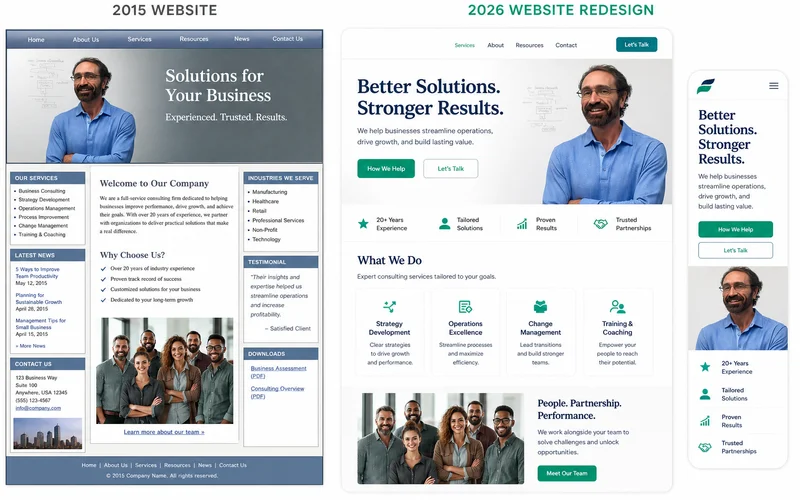
4. You Can’t Update It Without Calling Your Developer
You need the ability to make basic text and image changes without waiting days for a developer ticket to process. Modern small business sites should empower you to swap a photo, edit copy, or add a new service yourself.
We believe your digital presence should be a helpful marketing asset, not a hostage situation. If every minor update requires an email and a 72-hour wait, the platform is fighting you instead of supporting your growth.
Many older setups rely on rigid page templates or hard-coded HTML that require technical expertise to modify. Modern tools like Webflow or the native WordPress block editor eliminate these bottlenecks entirely.
Benefits of a modern Content Management System (CMS):
- Publish new blog posts or case studies in minutes
- Update holiday hours across the site instantly
- Fix typos without paying an hourly maintenance fee
- Upload new team member photos effortlessly
5. Lead Volume Is Flat or Declining
Steady or growing traffic combined with flat lead volume usually indicates a severe conversion problem. You have visitors, but your site is failing to turn them into actual business inquiries.
We analyze traffic data daily, and we often see sites suffering from multiple conversion killers simultaneously. These include weak calls to action, slow contact forms, buried contact info, unclear value propositions, and a total lack of trust signals.
A redesign with conversion as the explicit goal usually doubles inquiries within a few months. Recent 2026 conversion research from Reform app shows that improving form speed and simplifying input fields can boost form completions by up to 27%.
Here are the elements needed to fix a declining lead rate:
- Clear and compelling calls to action on every page
- Frictionless contact forms with minimal required fields
- Visible phone numbers in the main header
- Customer testimonials and professional certifications
6. Your Map Pack Rank Has Dropped
Your website’s technical health directly impacts your local Google Business Profile visibility. Local rankings depend heavily on website signals like page speed, structured data, content relevance, and mobile experience.
We frequently trace mysterious map ranking drops back to an outdated website foundation. If your Google Map Pack visibility has slipped over the last year despite keeping the same profile setup, your website is likely dragging it down.
Recent 2026 search algorithm analyses from Seize Marketing Agency confirm that Google Core Web Vitals are critical ranking factors for the Local Map Pack. Google rewards businesses that provide a fast and secure mobile experience.
Technical factors that sink local rankings include:
- Failing Largest Contentful Paint (LCP) speed scores
- Missing local schema markup in the site code
- Inconsistent business name and address data
- Poor layout shifts that cause the screen to jump
7. The Content Doesn’t Reflect What You Actually Do Today
Misaligned content confuses prospective clients and brings in the wrong type of leads. Businesses naturally evolve, but their digital storefront rarely keeps up with the pace of change.
We regularly consult with local service professionals who are tired of answering the phone for services they stopped offering two years ago. This misrepresentation costs you valuable time and frustrates potential buyers.
If your service areas, pricing models, or core offerings have shifted, the site is actively holding you back. A static website fails to capture the higher value projects your company is now capable of handling.
Content updates you should verify annually:
- Current geographic service areas and city pages
- Accurate pricing tiers or starting project minimums
- Recent case studies reflecting your best work
- Updated team bios and company history
8. Competitors Have Visibly Modernized
Customers constantly shop around, and an older site will lose the unspoken comparison test every single time. Open three local competitor sites on your phone and compare them objectively against yours.
We find that potential buyers who evaluate three to five options will subconsciously skip the one that looks the least professional. If your competitors all look noticeably newer, you are losing the crucial first impression battle.
Recent 2026 industry data shows that US small businesses are actively investing in their digital presence. Average professional website redesigns currently cost between $2,000 and $10,000 to keep up with consumer expectations.
| Feature | Outdated Competitor | Modernized Competitor |
|---|---|---|
| First Impression | Cluttered, confusing layout | Clean, clear value proposition |
| Mobile Access | Requires pinching and zooming | Formatted perfectly for thumbs |
| Trust Elements | Stock photos and old copyright | Real team photos and recent reviews |
| Action Steps | Hard to find Contact Us link | Floating Call Now mobile button |
9. You Avoid Sending People to Your Own Website
If you frequently ask yourself “is my website outdated”, your subconscious already knows the digital experience is poor. Think about the classic business card test.
We ask new clients a simple question during initial consultations to gauge their confidence. Would you be perfectly comfortable handing your business card to a high-value prospect right now, knowing they will visit your site within an hour?
If the answer is “not really” or “I would want to fix it first”, the decision is already made. Apologizing for your website actively damages your brand equity and authority before you even get a chance to pitch your services.
Signs of low website confidence:
- Relying exclusively on Facebook or Instagram links
- Telling prospects to just call you directly instead
- Leaving your web address off printed marketing materials
- Feeling embarrassed when someone mentions looking you up
When to Refresh vs Rebuild
Knowing when to redesign your website is simple. A visual refresh works well for minor aesthetic tweaks, but a full rebuild is strictly necessary for structural failures.
The choice depends on how many of the warning signs apply to your current setup. We advise looking closely at your underlying platform before spending a single dollar.
Refresh ($500-$2,000): This is the right move if the foundation is solid and you only have two or three of the signs mentioned above. You can update visuals, rewrite hero copy, fix mobile bugs, and add modern trust signals. This usually takes one to two weeks of work.
Rebuild ($2,000-$10,000): This is required if you have four or more of the warning signs, if the site is on a heavy page builder, or if the mobile structure is completely broken. Patches will not close the performance gap. A modern lightweight tech stack will solve the root problems. This requires two to three weeks of work.
For most Hartford County small businesses with sites older than 4 years, the math is in favor of a rebuild rather than another round of patches. If you are noticing multiple signs your website needs a redesign, reach out to our team today to evaluate your current digital foundation.
Frequently Asked Questions
How often should a business website be redesigned?
Every 4-6 years for a full redesign; minor refreshes every 1-2 years. Faster if Google's algorithm or device sizes change significantly, or if your business pivots in ways your current site doesn't reflect.
What if my site looks fine but isn't getting leads?
Looks are only one of five reasons. Conversion problems often hide behind decent-looking design — unclear messaging, weak CTAs, slow forms, buried phone numbers. Audit conversion separately from design.
Is it cheaper to fix or rebuild?
If the foundation (CMS, template, hosting) is solid: fix. If it's bloated, outdated, or DIY-builder: rebuild is usually cheaper long-term. Patches on bad architecture rarely produce good results.
Have a question this guide didn't answer?
Send a quick message. Joseph replies personally, usually the same day.